Posts in Photography

A movie without sound is a photo…

When making movies with the recent (or not so recent considering the 5D Mark II is 1.5 years old by now) HD capable DSLRs, audio is almost always the weakest link. I’ve got some good footage with horrible audio and in controlled environments, my Rode Stereo Video Mic gives good sound. I’ve taken it off camera and boom mounted it for some cases but the camera isn’t always the best recording medium at times. I’ve been looking at Zoom’s H4n but it’s a bit beyond my budget at the moment. Come July however, Zoom will release something for the budget movie makers like myself. The Zoom H1. Same XY mic arrangement, smaller form factor and most notably, the USD99 price tag. It only has a single input and output jack but that’s good enough for myself.

  • Stereo X/Y mic configuration captures perfect stereo images
  • Same frequency and SPL handling as popular Zoom H2
  • Records Broadcast WAV (BWF) at 96kHz/48kHz/44.1kHz at 16-bit or 24-bit
  • Records MP3 from 48 to 320kbps for maximum recording time
  • Hi-Speed USB 2.0 port
  • Built-in reference speaker
  • Includes 2GB microSD card and one AA battery
  • One AA size battery allows 10 hours operation
  • Accommodates up to 32GB microSDHC memory cards
  • Track marker function
  • Low cut filter
  • Built-in tripod mount
  • 1/8″ external mic input
  • Stereo 1/8″ line output
  • Auto record level

NAS Purchasing Questions

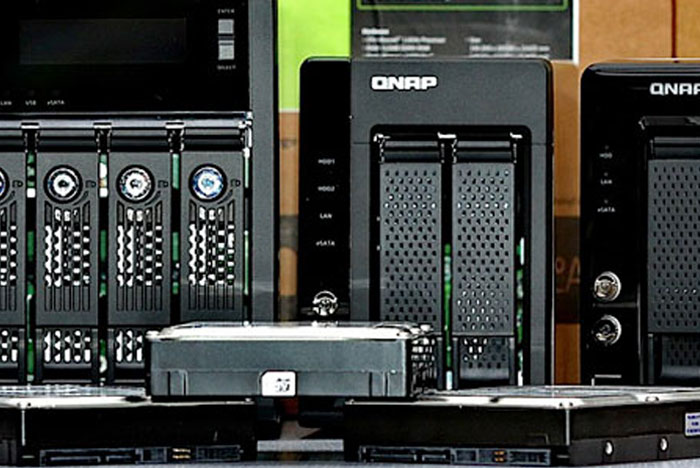
Seems like after posting the NAS entries, I got a question from a friend trying to archive his photos as well as other data, i.e. media files, documents, backups, etc. So how do you decide which NAS to buy?

For everyone and anyone who asks me, I’ll always go with a dual-drive NAS. If you decide to go with a single drive NAS, you might as well go with USB disks like Seagate FreeAgents or WD Elements. So, basically you have to calculate how much storage you need. One area to start with is to see how much space you use in one year and how much that grows. My average storage needs (photos only) are about 600Gb/year. Chances are that won’t increase much unless I upgrade my cameras. I do budget a 10% increase. I do have other needs also so by the time I added everything in, it’s a large number.

Secondly, ask yourself f the NAS is your primary backup or not. If it is, it will need to be able to store all your backups. It’s good to take into account a 3-year plan so if you need 600Gb/year, then your NAS will be or must be able to grow to accomodate at least 2TB. This actually then dictates the size of your NAS. If it’s secondary storage (like in my case) where you have backups somewhere else (Hard drives, DVDs, BDs, etc) then the requirements are different. I wanted past 3-years of media (Photos & videos) on my NAS while my main backup stores everything. This required at least a capacity of 2.2TB at least which is why I went with a 4-drive unit. Most 2-drive NAS units max out at 2TB (2x2TB disks in mirrored/RAID1 config).

Finally, the next thing you need to consider is how fast you want to get the data off the NAS. I assume you’d be connecting at least via gigabit speeds. The specifications of the NAS play a part in the speed (excluding poor network speeds) aspect so normally I look at what CPU the NAS has along with the memory.

So what are my choices/recommendations?

Budget: DLink DNS-323
Cheaply priced (RM439/USD130), it’s the lowest cost 2-drive NAS I would buy myself.

I’ve only had experience with QNAP and Synology NAS units so that’s what I’ll stick with. You can go over to Smallnetbuilder and check their NAS reviews but not all are available locally in Malaysia. Here’s a handy performance chart for QNAP and Synology NASes.

Two-bay units:
Synology : DS210j or DS209
Qnap : TS-210 or TS-219

Two-bay units (higher performance):
Synology DS210+
Qnap TS-239 Pro II

Four-bay units:
Synology : DS410j
Qnap: TS-410 or TS-419P

Four-bay units (higher performance):
Synology : DS410
Qnap: TS-439 Pro II

note: this list above is from May 2010. If you need more space, you can consider the 5 and 6 bay models.

Storage tools and utilities link

Apologies for the quick publishing of yesterday’s post. Here’s some links to the tools and software I use.

CF & SD Card copier:
– Breeze Systems Downloader Pro

Copy and Sync tools:
Robocopy (comes with most editions of Vista & Windows Server
DeltaCopy (Windows version of unix rsync)

System Backup & Imaging tools:
Acronis True Image 2010 with Plus Pack

Miscellaneous tools:
Link Shell Extension — keep for files central with junction tools
checksum –File integrity checking:

Storage strategies

A few people have asked me to elaborate on my storage strategy so here it is. Some background information is needed first. I started taking photography seriously in 1998. Buying my first SLR back then was a big thing and working through the lenses and other options. In late ’99, was basically scanning the prints on a flatbed scanner. Quality was amazing, or at least what I thought was amazing until I stumbled upon a very expensive (at that time, I wasn’t making much a month) option; the slide scanner. By skipping the printing stage and scanning directly from film, it delivered unmatched results from anything else unless you’re comparing to a drum scan. Since then, I’ve been scanning almost all my slides and negatives but most of what I shot were from my travels. Film costs a fair bit, especially if you shot transparency film such as Fuji Velvia, Kodachrome or Elitechromes, so the everyday life doesn’t often get captured on film.

So with digital scans dating all the way back to 2000 (the 2700 dpi scans tend to produce on average 14MB LZW compressed TIFF files), storage is key, along with a proper backup strategy. I went with CD-Rs and then DVD-Rs but they never were convenient (not fun, not quick, and laborious process) meant that you will almost never will do it timely enough so I decided to stick with hard drives. They get cheaper and are inherently quicker to access if they’re stuck into a spare machine that can be booted up anytime you needed to.

I upgraded scanners so the file sizes got bigger and films like Velvia and EliteChrome 100 pushed the resolution (grain?) further. Then came my first DSLR, a 300D (my shortest-lived DSLR ownership) and my 20D several months later. So came RAW files, 16-bit PSDs, and the story continues until I hit my 5D Mark II with 21-megapixels, Full HD movies. Backup is getting more important but also important is accessibility.

I needed to backup and offload my main PC but also need to access the “older” stuff occasionally. Leaving your main storage server switched on/off daily or 24×7 wasn’t something I want to do on a daily basis so I got a NAS which I quickly outgrew within a year so that too got upgraded to a 4-bay unit.

I have a storage server with 6x1TB disks. It’s all RAID 1. Mirrored. So I get a net space of 3TB. I have a “_photos” folder shared out that further breaks down by year, i.e. “2001”, “2003”, along with some odd directories. I also have a “_videos” folder where I back up my created DVDs (ISO format) and Adobe Premiere Pro project files. The problem is occasionally accessing stuff from say, 2006. My main PC only stores past 16-odd months so I ended up going to my storage server regularly. So what’s running 24×7 is my NAS box with 4x500Gb in RAID5. That gives me about 1.4TB of disk space. That way, I get that past 2-years on it; i.e. 2008 & 2009 along with my 60Gb music collection on the built-in iTunes server. My IP cameras also record to NAS and they keep the past-7 days recording. I also have imaged backups of all the machines in my home so that if the primary disk crashes, recovery is just a click away. Keeping everything in sync is the unix utility rsync (the windows equivalent is DeltaCopy).

With the growing file sizes, I’ll be moving my storage server to 1.5TB disks by Q4 this year and my NAS will grow to 4x1TB*… one can never have enough disk space!

* That’s one thing I like about my NAS. I can live swap the disks and expand it without powering down and losing my data. I can easily move from 500Gbx4 to 1TBx4 and later to 2TBx4.

Mark II Firmware, GF1 Firmware and then some

Canon has released 2.07 Firmware for the 5D Mark II

This firmware update (Version 2.0.7) incorporates the following improvements and fixes.

  • Fixes a phenomenon in which the aperture exhibits abnormal movement when shooting movies in manual exposure mode and Aperture Priority AE (Av mode) using some Canon lenses (such as macro lenses)
  • Fixes a phenomenon in which the exposure level shown in the LCD panel differs from what is shown in the viewfinder when shooting still images in manual exposure mode.
  • Fixes a phenomenon in which the Wireless File Transmitter (WFT-E4 or WFT-E4 II) may not automatically power off when used for FTP transfers.
  • These phenomenon only occur with the Version 2.0.4 and Version 2.0.3 firmware.

Download it from here.

Of course Panasonic already released updated for the micro 4/3s system such as my GF-1. Firmware 1.2 can be downloaded from here and it fixes the following:

  • Improved operation menu for image stabilizer ([OFF] will be added under [STABILIZER] only when LUMIX G VARIO 14-42 mm / F3.5-5.6 ASPH. / MEGA O.I.S. (H-FS014042) is attached).
  • Improved AF (auto focus) performance with lenses of other manufacturer.

The GF-1 update doesn’t affect me at the moment. I’ve only noticed the Mark II problem once in China but update I will.

Been busy on work but also working on two Photobooks, and prepping some small surprises come second half 2010.

Yes, cameras do grow on trees!

Panasonic GF-1 – real world experience

I’ve had my little Lumix GF-1 for two months plus now. This is not a technical or “proper” review of the camera but it’s more like my experience using it. My GF-1 comes with the 14-45mm stabilized lens. I might add the 20mm pancake lens at some point but for now, it’s a one-lens camera. My reason for the GF-1 is purely to complement my full-sized 35mm DSLR. I use the 5D Mark II by the way so the GF-1 is not a replacement for my main cameras. The GF-1 is used for situations where a larger DSLR and lenses are not required. For me, it’s primarily for travel and all-round carry with me camera. My need for the GF-1 comes from situations where I would like a better camera than my iPhone but the situation doesn’t warrant me carrying my 5D.

Stabilizer worked well here – ISO 800, 1/10s, f/5.1

Travel. I always travel with my full kit of photo equipment. However, there are times the GF-1 gets used such going down for the hotel breakfast, on the flight, serious hiking when my DSLR is stowed because I need my hands. Since the GF-1 is lightweight, I can have the GF-1 around my neck, ready to shoot something. It’s also less intrusive when doing street photography. As the GF-1 can look like a little point and shoot camera, more likely everyone’s going to ignore what you’re doing. When not traveling, the GF-1 goes with me to little restaurants, coffee shops, work (sometimes), and all sorts of places. Currently, either I carry it naked as is or in my ThinkTank Photo Speed Changer. I’m looking to get either the Trim Changer or All the Other Stuff as a permanent GF-1 case though. It’s a relatively hardy little camera though and fairly well built.

A small camera is less intrusive and hence, most people will allow you to take their photo. ISO 100, 1/125s, f/4

Performance
The GF-1 is pretty much fast enough for almost everything I use it for. From street photography to people and a little bit of action. Yes, the buffer is small when you shoot raw but if I’m shooting fast action, chances are, I’m using my DSLR. Quality is good if you keep the ISO below 800 and if you shoot raw. In well lit scenes (i.e. outdoors), the quality can be comparable to a cropped sensor DSLR (i.e. 500D, 50D, etc). In low light, the sensor does struggle but you can have everything. Battery life is amazingly good — I do have a spare and I only charge it after three days. Note that I do use my DSLR as well so remember that this is assuming a second camera. That said, I have the camera power save set to five minutes and it’s hardly turned off. Auto-focus is mostly good with occasional misses. The stabilized lens helps here. The lens hood works well to minimize flare and I’ve used the GF-1 in light rain, heavy wet fog without problems.

The ability to shoot HD movies is great although audio capture is just average without an external mic. The wind-filter works to some extent but it doesn’t help stop user and other little sounds from being captured. The AVCHD lite codec is a pain in the ass to work with though.

Nanjing Road night scene, ISO 1600, 1/200s, f/4.5

Ergonomics and usability
The menu system is overly complex and the usage of icons and abbreviations doesn’t help. I find it easy to inadvertently set something up when the camera is bumping around powered on. The small size however makes camera shake more pronounced. The shutter lag is almost negligible with the camera focusing and taking the shot almost as you press. That can’t be said about the video though. The dedicated video start/stop button is great but it’s laggy and sometimes takes a second or two to register. That said, if you ensure the shutter speed is relatively fast (1/100s), you can get great results. It’s also the camera I let other friends, local guides or strangers to take photos of myself or our group.

Image quality
In China, I shot RAW exclusively. While noise levels above ISO 800 was fairly high, it definitely beats any point-n-shoot’s pixel dense sensor out there. The ten-plus megapixel (I’m no fan of 4:3 ratio images so the GF1 is set to 3:2 ratio) images are quite awesome – with some processing, they look great. With ISO 1600 or 2500, a bit of noise reduction processing (I use Noise Ninja), the output is still pretty fantastic. With ISO set below 800, prints up to 12R (12″ x 16″) are quite achievable and look indistinguishable from any mid-range DSLR.

Discrete shooting at the Nanjing Mass grave site, ISO 2000, 1/30s, f/3.5

Crowded & packed train stations means the GF1 is always on-hand. ISO 1250, 1/13s, f/3.5

Or even hiking. West Sea Canyon, Huangshan, China. ISO 100, 1/200s, f/4.5

For some real reviews, you can check DPReview or Steve’s Digicams.